Knowledge Base - Level 1 Google Security
On October 24, 2022, all faculty and staff will be allowed to begin storing Level
1 (confidential) data in Google Drive and Google Shared Drives.
What is Level 1 data?
Level 1 is the highest level of sensitive data - Confidential. Confidential data may include personally identifiable information, Social Security numbers, medical data, tax, and bank account numbers, as well as credentials and passwords.
Examples of Level 1 data include, not all inclusive:
- Passwords or credentials that grant access to Level 1 data
- Birth date combined with last four digits of SSN and name
- Credit card numbers with cardholder name
- Tax ID with name
- Driver’s license number, state identification card, and other forms of national or international identification (such as passports, visas, etc.) in combination with name
- Social Security number and name
- Health insurance information
- Medical records related to an individual
- Criminal background check results
More information on Level 1 can be found on our Data Handling Standard here.
How do I store data in Google Drive?
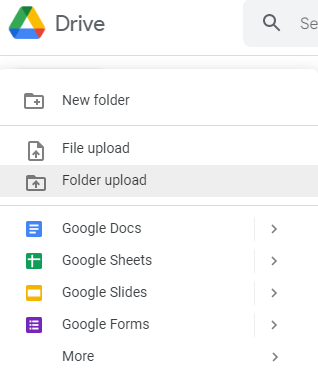
On October 24, 2022, you can begin storing Level 1 (confidential) data in your Google Drive. To upload data to Google Drive, simply navigate to drive.google.com and then either drag and drop your files and folders or click new > upload and select them:
How is Fresno State preventing the unauthorized disclosure of Level 1 (Confidential)
data?

To prevent the unauthorized disclosure of private data, Fresno State has implemented
Google Drive rules that will warn staff members when they try to share (externally)
documents or folders that may contain sensitive Level 1 (confidential) data:
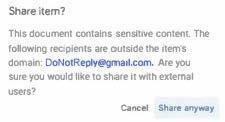
If you see this warning, please double check that the file or folder you are sharing
does not contain any data that may be Level 1 – Confidential Data.
Questions?
Technical questions regarding how to save Level 1 (confidential) data to Google may be directed to the Service Desk at 559.278.5000 or visit the Technology Services website.
Questions about Level 1 (confidential) data may be directed to the Service Desk, and you will be contacted by the Technology Service – Information Security Office.
This PDF is provided as a print-only reference document and may not be fully accessible to users of assistive technology. For more information, please visit Title II Rule on Digital Accessibility page.